

Making the Most of the 2027 Buick Enclave’s 30-inch Ultrawide Screen around Bethlehem, PA
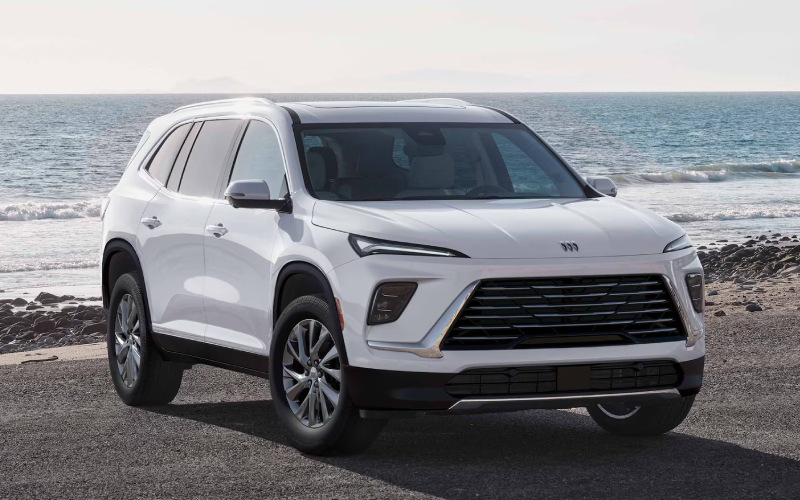
Miracle Auto Group – Making the Most of the 2027 Buick Enclave’s 30-inch Ultrawide Screen around Bethlehem, PA
The 2027 Buick Enclave’s 30-inch Ultrawide display does more than look impressive at first glance — it simplifies everyday driving with an interface that is crisp, intuitive, and thoughtfully organized. For drivers who split time between navigating West Broad Street, dropping off at schools near the South Side, and cruising Route 378, that unified view helps you focus on the drive with the details you need right where you expect them.
What sets this system apart is how naturally it surfaces information. Rather than tapping through multiple sub-menus, the core tiles and customizable layouts keep essentials — navigation, media, calls, and key vehicle info — within easy reach. That means fewer distractions, more confidence in your route, and better context when you’re managing multiple tasks behind the wheel.
Why a single, ultrawide display matters on busy local roads
Smaller, separate screens can scatter your attention and force more glances away from the road. The Enclave’s Ultrawide layout reduces that by placing clusters and infotainment side-by-side on a seamless canvas. Whether you are merging near the Hill-to-Hill Bridge or timing lane changes on Schoenersville Road, a larger, more legible interface can make a day’s worth of decisions feel smoother.
The display’s clarity also helps during quick-turn errands. With prominent album art, clear caller ID, and responsive maps, you can decipher what is happening at a glance — and get back to the task at hand. It is that blend of design and utility that makes the system feel premium and practical at the same time.
Practical ways to personalize your Enclave’s Ultrawide screen
Personalization is the secret to getting the most from any modern interface. The Enclave’s system lets you rearrange frequently used apps, fine-tune driver information, and tweak themes so the display feels tailored to your habits. If you’re a frequent navigator, give the map more real estate; if you rely on calls and podcasts, pull those tiles forward so they are visible without poking through menus.
During the first few days, take a few minutes when parked to set it up your way. Once you do, the display fades into the background and simply supports how you already drive — that is the hallmark of smart design.
- Map-first layout: Prioritize navigation tiles if you regularly hop between downtown and neighborhood stops
- Media-forward setup: Keep audio controls and track info large if you live by playlists and podcasts
- Call clarity: Elevate phone tiles so caller ID and favorite contacts are instantly visible
- Status at a glance: Reserve space for key vehicle info so you always know what your Enclave is doing
These small choices pay off immediately. The fewer taps you make, the more attention remains on the street signs and traffic around you.
How the display complements the Enclave’s calm, connected cabin
Technology is only as good as the environment around it. In the Enclave, QuietTuning® with Active Noise Cancellation helps keep road noise out, so navigation prompts and calls come through clearly. Pair that with the available Bose Performance 16-speaker system on Avenir, and you get a soundstage that feels balanced for everything from conference calls to audiobooks and concert recordings.
The Ultrawide display also dovetails with the Enclave’s convenience features. The AutoSense programmable power liftgate makes drop-offs and pick-ups easier when you are juggling bags and gear. Inside, available one-touch flat-folding second-row seats help you adapt to changing cargo without hunting through menus — a literal push-button solution in a cabin where the screen is only one part of a larger, well-thought-out experience.
If you choose the available Super Cruise® system, the display helps communicate status changes clearly on compatible roads. Visual cues and clean iconography mean you always know when the system is engaged — helpful context for longer drives toward the Lehigh Valley’s surrounding highways.
Everyday tips for smoother screen use
It is worth spending a few minutes learning the quick-access gestures and confirm prompts. That time investment pays dividends when traffic compresses and you need something fast. Keep your key tiles consistent, avoid frequent reorganization, and test a couple of theme options to find the contrast and color balance that works best for you day and night.
- Set core tiles once during a parked session
- Use larger tiles for your top two tasks
- Keep the map on screen if your routes change often
- Let voice controls handle secondary functions
Voice control can be an underrated ally here — when your hands are full, a quick voice prompt can adjust audio, place a call, or get directions without hunting for on-screen buttons.
Cabin design that supports long-term comfort
Trim choices let you pair technology with the materials and amenities you prefer. The Avenir’s quilted and perforated leather-appointed seating creates a sophisticated foundation for the Enclave’s tech, while heated and ventilated massaging front seats turn longer drives into more relaxed ones. If you spend a lot of time chauffeuring family or teammates, heated second-row outboard seats keep passengers comfortable in the back, and the panoramic power sunroof brings light in for all three rows.
Beyond materials, the Enclave’s design pays attention to sight lines and reach — the display’s position, wheel controls, and console storage work together so you do not feel stretched or crowded when you interact with the interface.
Is the Ultrawide screen right for you?
If you value a cabin that helps you stay organized rather than simply dazzling you with pixels, the 30-inch Ultrawide display is a thoughtful solution. It consolidates what matters and gives you enough flexibility to shape it to your priorities. Drivers who juggle family, work, and local driving demands around Bethlehem, PA will likely find the system reduces friction in the little tasks that add up across a week of commuting and errands.
When you are ready to explore it in person, we will help you get familiar with the display, compare trims like Preferred, Sport Touring, and Avenir, and set up settings that match your daily routine. Our team is comfortable walking through the setup process so you leave with a screen that already feels like yours.
Frequently Asked Questions:
Can I customize what appears on the 30-inch Ultrawide display?
Yes. You can rearrange app tiles, adjust layouts to prioritize maps, media, or calls, and fine-tune themes to your preference. Setting it up while parked helps you learn the interface quickly.
Does the display work well with voice control?
The system is designed to complement voice commands for hands-on-the-wheel convenience. Use voice prompts for quick navigation entries, calls, and audio adjustments while keeping eyes forward.
How does the Ultrawide display interact with available Super Cruise®?
The interface provides clear visual cues to communicate status on compatible roads, helping you understand when hands-free capability is available and engaged.
What audio options pair best with the display?
The available Bose Performance 16-speaker system on Avenir offers an immersive soundstage that complements the clarity and polish of the Ultrawide screen.
We are committed to making your technology feel easy. When you visit, you will get hands-on time with the 30-inch Ultrawide display and the rest of the Enclave’s cabin features — and a test route tuned to the way you actually drive around Bethlehem. Miracle Auto Group is proudly serving Reading, Bethlehem, and Lancaster with guidance that keeps your shopping process focused and comfortable. If you are curious about the workflow that fits you best, we will walk you through options step by step — no rush, no pressure, just a clear, helpful path to your ideal three-row SUV.
When you are ready to take the next step, we are here to schedule a test drive, compare trims side-by-side, and answer layered questions about the Ultrawide display, available Super Cruise®, seating flexibility, and more. With the right setup, the Enclave’s technology becomes a quiet helper, supporting each day’s routes without getting in your way.
As you consider your choices, bring a short list of what you need your SUV to do — from school drop-offs to weekend trips — and we will tailor the Enclave’s settings so the display, audio, and driver-assist systems are already working for you before you leave the lot.
*Image may not be actual model

0 comment(s) so far on Making the Most of the 2027 Buick Enclave’s 30-inch Ultrawide Screen around Bethlehem, PA